

There are many ways to watch your favorite movies and TV shows. But, while some methods may be more convenient, the best Blu-ray players still provide unbeatable picture and audio quality.
I’ve used a Blu-ray player since the first models were released nearly 20 years ago. Yes, I still subscribe to Netflix, Disney+ and Amazon Prime, but I prefer using my Blu-ray player because it looks and sounds better.
After researching numerous players, I’ve selected the Sony UBP-X700M as the best Blu-ray player overall. It has outstanding 4K picture quality and all the features most people need.
But there are different reasons to buy a Blu-ray player. Each has pros and cons. So I’ve suggested four other players in different categories to make your choice easier – budget, high-end, 1080p and players with analog outputs.
Key Points
- Choose player features that match the capabilities of your TV and audio system, such as HDMI and audio outputs, 4K, and HDR support.
- 4K Blu-ray discs provide better quality pictures over streaming services. Discs avoid streaming compression and internet speed issues.
- All Blu-ray players offer the best uncompressed audio formats – Dolby TrueHD and DTS-HD Master Audio. You won’t get these on streaming services or a DVD player.
- Prioritize the key features you need, like good upscaling, certain audio formats, and smart apps.
Main Topics
Best Player Overall
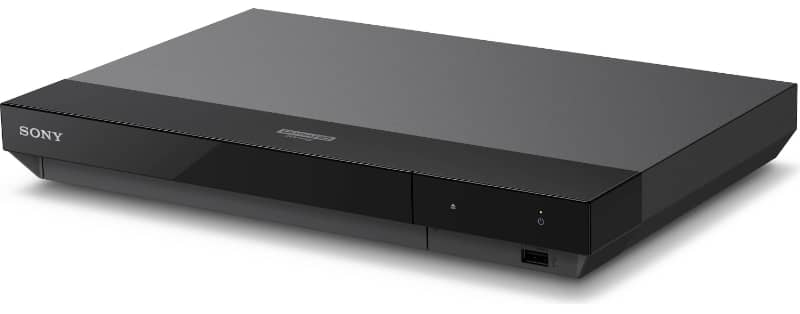
Sony UBP-X700M

Best Budget 4K Player
Panasonic DP-UB154P-K

Best High-End Player
Panasonic DP-UB9000P1K

Best 1080p Player
Sony BDP-BX370

Best Player With Analog Outs
Panasonic DP-UB820
Best Blu-ray Player Overall
A 4K UHD Blu-ray player will give you a stunning picture on any high-quality TV or projector. Yes, they are more expensive than 1080p models, and the discs cost more. But, boy, will you be in for a visual treat.
With a more detailed resolution and, more importantly, the introduction of HDR content with an increased color gamut, a 4K Blu-ray will give you a picture that will knock your socks off.
Choosing the right model can be tricky, but the best overall Blu-ray player should offer a top-notch performance with enough features to suit most home theater fans – without costing the earth.
- Natural and highly detailed 4K images
- Good value for money
- It plays most disc formats
- Small footprint
- Build feels cheap, but that’s not a problem when it’s tucked away under your TV
- Not the fastest response
- No HDR10+
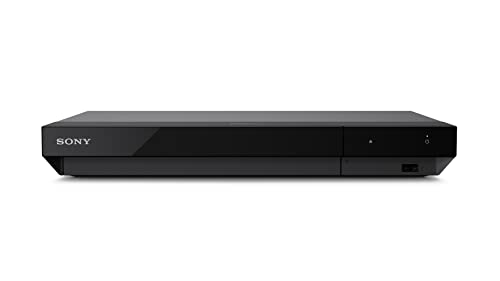
Top Pick: Sony UBP-X700M
- Key Feature: Excellent 4K all-rounder that ticks most of the boxes
- Type: 4K UHD
- HDR: HDR10/Dolby Vision
- HDMI Out/In: 2/0
- Optical/Coaxial Output: 0/1
- Other Connections: 1x USB (front)
- Ethernet/Wi-Fi/Bluetooth: Yes/Yes/No
- Dimensions (W x H x D): 12.6 x 1.8 x 8.5 in | 320 x 46 x 216 mm
- Weight (lbs/kg): 3.1/1.4
The Sony UBP-X700M is an excellent mid-range 4K Ultra HD Blu-ray player that delivers superb picture quality at an affordable price. It produces natural and highly detailed 4K images with 4K Blu-ray discs and upscaled HD Blu-ray content.
Colors are vivid and accurate, highlighted by the player’s support for HDR10 and Dolby Vision, the two major HDR formats. Remember, your hardware must support those HDR formats to work, and it doesn’t have HDR10+.
The sleek, minimalist design will fit into any home entertainment setup with its modern, angular body and two-tone black finish. However, it doesn’t have the premium feel of more expensive models.
Despite its budget-friendly price tag, the UBP-X700M doesn’t skimp on features. It includes two HDMI outputs, one supporting the latest HDMI 2.0 specification for full 4K HDR compatibility.
The other HDMI port is audio only for a separate connection to an amplifier. Of course, there are no analog audio outputs, so the audio quality relies on your amp and speakers. But all the major audio formats are available, so you shouldn’t be disappointed.
Built-in WiFi makes connecting to a streaming service like Netflix and Amazon Prime Video convenient. The intuitive user interface makes accessing disc or streaming content quick and easy. Disc load times are relatively fast, although not the best.
The remote control included with the player is basic but functional. I wish Sony had opted for a more premium-feel remote on this model, a minor drawback mentioned by a few users. Operating the player via the Sony SideView app on a smartphone or tablet is a viable alternative.
With excellent picture quality, broad format support, and easy access to 4K streaming content, the Sony UBP-X700M presents tremendous value for consumers looking for an affordable but highly capable 4K Blu-ray player.
Though its construction could be better, its competitive retail price makes those concerns easy to overlook. For shoppers on a budget wanting to enjoy their movie collection in full 4K HDR glory, the UBP-X700M is a superb choice that outperforms its price.
Best Budget 4K Player
There’s no doubt that buying the latest and greatest home theater equipment can be expensive. So, most people will have to choose where they allocate most of their budget.
However, the good news is that if you buy a budget 4K Blu-ray player, you can still experience all the benefits of 4K without breaking the bank.
You may lose some features – like built-in streaming apps and different connection types – but these won’t be a show-stopper for many people. Your TV may already have all the apps you need – and most setups only need a single HDMI output.
If you think about the must-haves – rather than the nice-to-haves – you may find that a budget player will do quite nicely.
- Great picture quality for the price
- Good upscaling
- Excellent value for money
- Limited output options
- Small remote control
- No Dolby Vision HDR, streaming apps or Wi-Fi
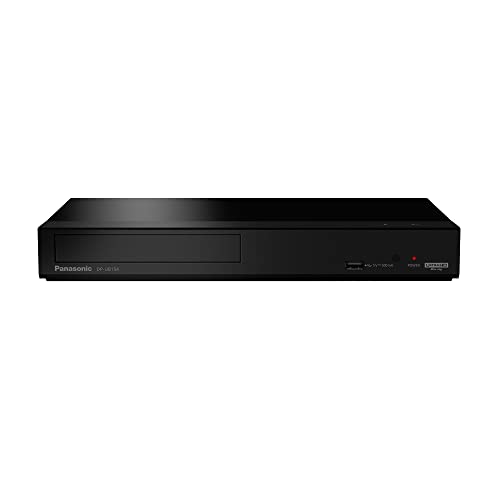
Top Pick: Panasonic DP-UB154P-K
- Key Feature: Great value 4K player without all the frills
- Type: 4K UHD
- HDR: HDR10/HDR10+/HLG
- HDMI Out/In: 1/0
- Optical/Coaxial Output: 0/0
- Other Connections: 1x USB (front)
- Ethernet/Wi-Fi/Bluetooth: Yes/No/No
- Dimensions (W x H x D): 12.6 x 1.8 x 7.6 in | 320 x 46 x 193 mm
- Weight (lbs/kg): 2.7/1.2
The Panasonic DP-UB154P-K Blu-ray disc player delivers stunning 4K picture quality and immersive sound at an affordable price, earning it the Best Budget 4K Player title.
Retailing for around $200, this compact player supports 4K Ultra HD playback with High Dynamic Range (HDR) in HDR10, HDR10+, and Hybrid Log-Gamma formats.
It utilizes Panasonic’s 4K high-precision chroma processor to optimize color, clarity and detail in 4K content. The player handles your disc library smoothly, playing 4K Blu-ray, standard Blu-ray, DVDs, and CDs.
Beyond pristine video, the DP-UB154P-K shines with high-resolution audio playback. It can decode popular formats like FLAC, DSD, ALAC, and AIFF, allowing audiophiles to get the most from their music files. The player has an ethernet port and USB for multimedia playback off drives.
While light on extra features compared to premium players, the DP-UB154P-K nails the core essentials of 4K video performance and support for the main audio formats. It earns glowing reviews for its picture quality, with crisp detail and accurate colors.
The simple remote and interface make it easy to operate. At just 1.2kg, its compact size fits into any setup.
For home theater enthusiasts seeking an affordable path into 4K Blu-ray, the Panasonic DP-UB154P-K is a superb choice.
It delivers breathtaking 4K video matched with versatile audio support, earning its reputation as the Best Budget 4K Player. If you want premium picture quality without the price tag, the DP-UB154P-K is a winner.
Best High-End Player
A high-end Blu-ray player must be on your wish list if you are a home theater enthusiast who must get the best performance.
You must buy one of these bad boys to get the best picture and sound quality in your room.
A high-end Blu-ray player will have industry-leading video processing, outstanding audio performance and allow you to play every content format you might need.
- Outstanding 4K picture quality and upscaling
- 7.1 analog audio out
- Stereo balanced XLR output
- Expensive, the Panasonic DP-UB820 is cheaper with 7.1 analog outputs
- No SACD for the audiophiles
- It big, compared to most players
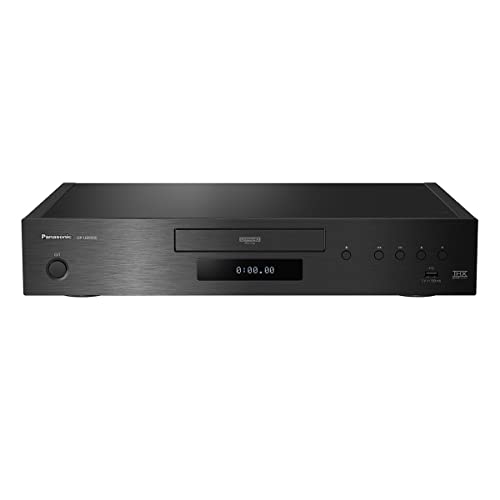
Top Pick: Panasonic DP-UB9000P1K
- Key Feature: The most fully-featured 4K player around
- Type: 4K UHD
- HDR: HDR10/HDR10+/Dolby Vision/HLG
- HDMI Out/In: 2/0
- Optical/Coaxial Output: 1/1
- Other Connections: 2x XLR (Balanced Stereo), 2x Analog RCA (Unbalanced Stereo), 7.1 Analog RCA, 2x USB (1 front + 1 rear)
- Ethernet/Wi-Fi/Bluetooth: Yes/Yes/No
- Dimensions (W x H x D): 17 x 3.2 x 12.8 in | 430 x 81 x 325 mm
- Weight (lbs/kg): 17.2/7.8
The Panasonic DP-UB9000P1K is a top-of-the-line 4K Ultra HD Blu-ray disc player with outstanding video and audio performance worthy of its ‘Best High-End Blu-ray Player’ title. This player exudes luxury by sporting a premium yet robust build quality with a two-layer chassis and thick steel plate construction.
Beyond its tank-like durability, the DP-UB9000P1K impresses with its ability to play a wide variety of disc formats, including 4K Blu-ray, Blu-ray 3D, DVD and CD. Although, because it’s not a Sony, there is no SACD support.
Its HCX processor optimizes color, clarity and detail when upscaling standard discs to near 4K quality. Support for advanced HDR formats like HDR10+, Dolby Vision and HLG provides exceptional contrast and brightness.
Audiophiles will delight in the player’s high-resolution audio capabilities and analog outputs with adjustable filters. The sound from the analog outputs is detailed and transparent. Plenty good enough for most picky audiophiles.
Of course, you can still stream to your amp if that sounds best. But it’s good to have the choice.
Connectivity is abundant with dual HDMI outputs, USB ports, ethernet and wireless networking. The user interface makes streaming services and file playback a breeze.
At around $1,000, this Blu-ray player sits at the high end of the price spectrum. It’s not a casual purchase. But for home theater enthusiasts seeking no-compromise performance, the DP-UB9000P1K delivers.
It has reference-level picture quality, numerous features and pro-level customization options. If you own a premium TV and sound system worthy of the best source component, the Panasonic DP-UB9000P1K belongs on your shortlist.
Best 1080p Player
If you have a Full HD 1080p TV, you don’t need to buy a 4K UHD player. However, buying a 1080p Blu-ray player with a lower output resolution doesn’t mean you won’t be getting some of the best pictures around.
A 1080p image can look fantastic on a quality 1080p display. You can also hear the soundtracks in high-resolution audio formats that you won’t get on a streaming platform. These sound great on a good sound system.
Don’t underestimate the excellent sound and picture from a standard Blu-ray player.
- Great value for a solid HD player
- 1080p pictures can still look great on a quality TV screen
- It’s all you need if you don’t want 4K
- Limited selection of apps
- Fairly slow to load
- No 4K UHD or HDR
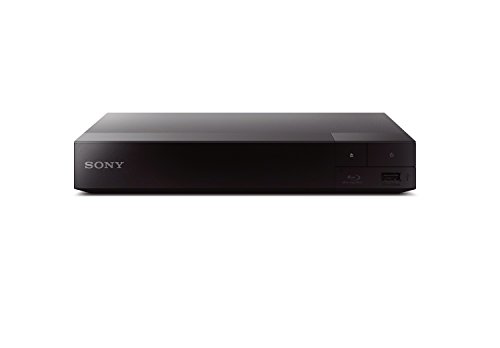
Top Pick: Sony BDP-BX370
- Key Feature: HD Blu-ray picture and audio at a bargain price
- Type: 1080p
- HDR: None
- HDMI Out/In: 1/0
- Optical/Coaxial Output: 0/1
- Other Connections: 1x USB (Front)
- Ethernet/Wi-Fi/Bluetooth: Yes/Yes/No
- Dimensions (W x H x D): 9 x 1.5 x 7.6 in | 230 x 39 x 194 mm
- Weight (lbs/kg): 1.77/0.8
The Sony BDP-BX370 is an affordable Blu-ray player that provides great performance and features for the price. Its compact 10.6 x 1.7 x 7.6-inch body can fit into any entertainment center while offering plenty of functionality.
The setup is quick and easy, thanks to the included HDMI cable and built-in Wi-Fi. The intuitive interface grants swift access to popular streaming apps, smoothly handling HD content from online services.
Please note this is a 1080p player, not 4K. So don’t buy this if you have a 4K TV and want to watch Blu-ray in higher resolutions (which you should). That said, this player really excels at delivering superb 1080p video quality on standard Blu-rays and DVDs.
Its upscaling technology takes DVDs to near 4K resolution, providing enhanced clarity and detail. HD Blu-rays look fantastic, with excellent contrast, color accuracy, and crisp detail, ideal for appreciating new and old films.
There are no analog audio outputs, so the only audio option is streaming the digital sound to your amplifier. Therefore, sound quality is totally dependent on your amp and speakers.
The build quality is unsurprisingly plastic and lightweight but acceptable given the affordable cost. Disc loading is fairly slow (typical for cheaper players), but streaming playback is smooth, and performance reliability is excellent over extended viewing.
While it omits the latest formats and extras, buyers wanting quality HD 1080p video will find tremendous value in the Sony BDP-BX370.
For the price, the features, performance, and streaming options are really impressive here. Light build and limited apps aside, this is easy to recommend for shoppers seeking a budget-friendly player that can deliver excellent Blu-ray and smart streaming performance.
Best Player with Analog Outs
Many audiophiles aren’t keen on streaming digital audio into their amplifiers. And some don’t have any digital inputs at all on their hardware. So, if you can’t – or don’t want to – stream digital audio into your amp, then a great solution is to let the player decode the digital audio.
There aren’t many players that can do this, but some higher-end models have multichannel 5.1 or 7.1 analog outputs – and top-end DACs to convert the audio.
Therefore, you can connect the player to your TV via HDMI for the 4K picture – and make an analog multichannel connection to your amplifier.
- Great value for a 7.1 analog output Blu-ray player
- HCX processor produces excellent pictures
- Plenty of connections and apps
- A worthy replacement for the much-missed Oppo players
- It lacks the extra outputs of the pricier Panasonic DP-UB9000P1K
- The drive is relatively noisy
- No SACD
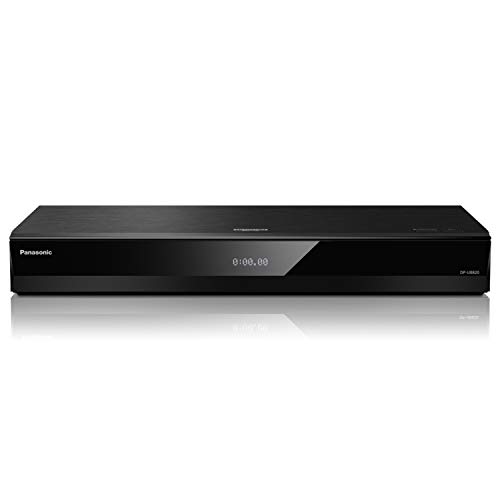
Top Pick: Panasonic DP-UB820
- Key Feature: Separate analog audio outputs if you can’t use HDMI
- Type: 4K UHD
- HDR: HDR10/HDR10+/Dolby Vision/HLG
- HDMI Out/In: 2/0
- Optical/Coaxial Output: 1/0
- Other Connections: 7.1 Analog RCA, 2x USB (1 front + 1 rear)
- Ethernet/Wi-Fi/Bluetooth: Yes/Yes/No
- Dimensions (W x H x D): 17 x 2.4 x 8.2 in | 430 x 62 x 208 mm
- Weight (lbs/kg): 5.3/2.4
The Panasonic DP-UB820 has earned the prestigious title of Best Player with Analog Outs thanks to its winning combination of stellar picture quality, powerful sound, smart connectivity, and outstanding value.
Priced at only $499, this 4K Blu-ray player delivers performance that punches far above its mid-range weight class.
At the heart of the DP-UB820 is Panasonic’s proprietary HCX processor. This advanced video engine unlocks the full potential of 4K Blu-ray discs, displaying intensely vivid and detailed images.
Colors are beautifully accurate and nuanced to create a truly cinematic picture.
The player also supports all major HDR formats, including Dolby Vision and HDR10+, providing incredible contrast and brilliance. Its unique HDR Optimizer ensures these cutting-edge displays are optimized scene-by-scene for peak image fidelity.
With integrated Wi-Fi and many popular streaming apps, the DP-UB820 also excels as a 4K media hub. Netflix, Amazon Prime Video, YouTube and more are just a click away. Surf the web, access files on your home network, or use the USB port to enjoy a diverse range of digital media.
Of course, with 7.1-channel analog outputs, the player also caters to discerning audiophiles who want the player to convert the audio rather than stream to their amp.
Connect to older AV receivers and amplifiers to experience your movie soundtracks in thrilling, room-filling surround sound. While the lack of SACD support is a slight drawback for niche audiophiles, the player does support hi-res FLAC, WAV, ALAC, and DSD files.
Paired with the DP-UB820’s muscular audio performance, your ears will delight at the immersive experience.
For home theater enthusiasts seeking top-tier 4K Blu-ray playback along with smart connectivity and analog versatility at a very wallet-friendly price, the Panasonic DP-UB820 is an unbeatable choice.
Comparison Table
| Model | Type | HDR | HDMI Out / In | Optical / Coaxial Output |
|---|---|---|---|---|
| Sony UBP-X700M | 4K UHD | HDR10/Dolby Vision | 2/0 | 0/1 |
| Panasonic DP-UB154P-K | 4K UHD | HDR10/HDR10+/HLG | 1/0 | 0/0 |
| Panasonic DP-UB9000P1K | 4K UHD | HDR10/HDR10+/Dolby Vision/HLG | 2/0 | 1/1 |
| Sony BDP-BX370 | 1080p | None | 1/0 | 0/1 |
| Panasonic DP-UB820 | 4K UHD | HDR10/HDR10+/Dolby Vision/HLG | 2/0 | 1/0 |
Buying Guide: What to Look For
If you are confused about which features to look for, here is a quick Blu-ray player buying guide highlighting the important points.
Types
A Blu-ray player offers significantly improved picture and sound quality compared to a DVD player due to the increased storage capacity of Blu-ray discs.

There are two main types of Blu-ray players to choose from:
- Standard: standard 1080p Blu-ray players support full high-definition 1080p video and high-resolution audio formats. They play standard Blu-ray discs.
- Ultra HD: UHD 4K Blu-ray players support 4K resolution and high dynamic range (HDR) for the best picture quality. They play Ultra HD Blu-ray discs and provide future-proofing for 4K TVs. Your hardware must support HDMI 2.0 and HDCP2.2 copy protection for 4K video.
Standard 1080p players and discs are cheaper than 4K versions – but you won’t get the best picture quality available. Most players also play 3D Blu-ray discs if you still have a 3D TV, although not all.
Video Formats and Picture Quality
The picture quality you can achieve depends on the player type:
- 1080p: Standard 1080p Blu-ray players display up to full HD 1920×1080 resolution. They can upscale DVDs and standard Blu-rays to 4K, but this is not true 4K quality.
- 4K: Ultra HD 4K Blu-ray players display up to 3840×2160 4K resolution with HDR for increased brightness, contrast and color. This provides the best and most accurate video image quality currently available on disc.
Your TV’s resolution will also limit the images you can see. So, if you buy a 4K player, but your TV is only 1080p, you will only see 1080p pictures. A 4K TV will show standard 1080p and 4K with HDR content.
If connecting to a 4K TV, check the quality of the video upscaling for non-4K content. Higher-end players tend to upscale better.
All players will support playing content from Blu-rays, DVDs and CDs – although remember that only 4K UHD players will play 4K discs.
Modern players also support various video formats, like MPEG, mp4 and MKV. You might need these when playing video files from the USB input.
However, video format support can vary between devices, so check if you require a particular type before buying.
Audio Quality
Blu-ray players support lossless and high-resolution audio for the best sound:
- All players support the basic audio formats – uncompressed stereo and compressed 5.1 Dolby Digital or DTS.
- Higher-quality audio formats like Dolby TrueHD and DTS-HD Master Audio provide studio-quality lossless sound. You won’t get these on streaming services or a DVD player.
- Advanced 3D surround sound like Dolby Atmos and DTS:X is supported by many new players.
- Use HDMI connections for simplicity or optical/coaxial digital audio connections to older audio systems.
The audio formats supported by your player are irrelevant if you don’t have a sound system that can play them.
Most TV speakers are limited to stereo PCM or Dolby audio. Consider installing an AV receiver or soundbar for surround sound and Dolby Atmos.

What about sound quality? Most Blu-ray players simply stream the digital audio data to a sound system as a bitstream (or decode it to PCM). This does not affect the sound quality.
When the sound system converts the digital data to analog to play on your speakers (using a DAC), this impacts sound quality.
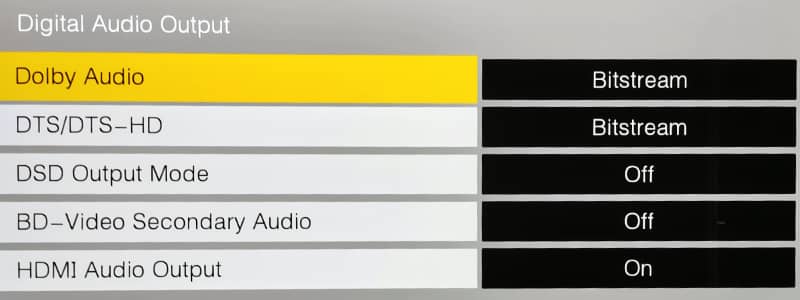
Beware reviews that say a player has great sound quality when it is simply passing digital data to an amplifier. This has no impact on the sound.
The only players you can evaluate sound quality for are those higher-end models with dedicated RCA analog audio outputs.
Learn more: Blu-ray audio formats explained
Connections
When purchasing a Blu-ray player, the connection ports are an important consideration to ensure compatibility with your TV, audio system, and home network:
- HDMI: At a minimum, the player should have one HDMI output to connect audio/video to a TV or AV receiver. HDMI 2.0 supports 4K HDR video. Some players have more than one output for sending audio to a separate amplifier. Other high-end players have an HDMI input for receiving video from another device.
- Digital Audio: An optical or coaxial digital audio output allows connection to an external audio system that lacks HDMI. This preserves high-resolution audio formats.
- Analog Audio: RCA stereo audio outputs can connect to older audio systems but will only pass standard stereo audio.
- Ethernet: A wired ethernet port enables the best connectivity for smart features and firmware updates.
- Wi-Fi: Wireless connectivity provides flexibility in placement but may have slower speeds/reliability for 4K streaming.
- USB: At least one USB port on the player lets you enjoy music/video files stored on a USB drive.
Here are the main connections on the Panasonic DP-UB820 player:

Considering your current home theater gear and how you want to expand in the future will help determine which physical connections are essential for your Blu-ray player purchase.
Smart Features
Many modern Blu-ray players integrate smart TV streaming capabilities and internet connectivity:
- Built-in apps like Netflix, Amazon Prime Video, and YouTube allow 4K streaming from those services.
- Check which specific apps are pre-installed; it varies between brands. Some players offer a wider selection than others. Popular apps like Netflix are common, but others may need to be downloaded separately. This is less important if you can access these services in other ways, like the apps section of your smart TV.
- Some players allow you to mirror content from mobile devices like phones and tablets. This lets you view photos, videos and other media from your mobile device on your TV.
The built-in smart features and apps make the Blu-ray player a central hub for physical media playback and streaming content. Just be sure to compare the apps and features included on different models.
Physical Considerations
The physical size and design of the Blu-ray player are worth considering before purchasing:
- Check the player’s dimensions to ensure it will fit nicely into your existing home entertainment setup. Allow space for ventilation around the unit.
- Many newer Blu-ray players are designed to be compact by eliminating the front information display. Players without a display screen tend to have a smaller footprint.
- If having a front display is important, be prepared for a larger player size. The display shows information like time elapsed and current chapter.
- Ensure the player has any physical connectors you require, such as front or side USB ports for access. Some players put all connections on the rear.
- Consider any noise issues. High-end players typically have quieter disc drives. Budget players may have some audible mechanical noise during disc spin-up. Some people find this annoying, and others won’t notice.
- Placement of the player is also important – allow easy access to discs, place near your TV at viewing level, keep connecting cables short, etc.
Thinking about the physical design and layout considerations will help you select the best Blu-ray players to integrate nicely into your existing space.
Wrapping Up
With the wide range of Blu-ray players available, selecting the right model for your needs and budget can be tricky. The good news is that Blu-ray technology still provides the best audio and visual quality for enjoying films at home.
While streaming may be convenient, true home theater enthusiasts will still appreciate the wider color gamut, increased resolution, lossless audio and extras that physical 4K Ultra HD Blu-ray discs provide over streaming.
Focus on the features that matter most for your TV and sound system.
But, after an extensive search for the best Blu-ray players, the Sony UBP-X700M Blu-ray player is a great all-rounder that ticks the right boxes for most people.
Frequently Asked Questions
The buying guide answers many questions about choosing and using a Blu-ray player. However, sometimes you need a simple answer to a direct question. So, here are the answers to some common questions.
Can You Play a CD or DVD on a Blu-ray Player?
Yes, you can play a CD or DVD on a Blu-ray player. All Blu-ray players are backward compatible with CD and DVD technology. So, you can ditch your old players if you wish and just have one device for all your discs.
Can You Play a 4K Disc on a Standard Blu-ray Player?
No, you can’t play a 4K disc on a standard 1080p Blu-ray player. You need a 4K UHD Blu-ray player to watch a 4K disc.
Are Blu-ray Players Region-locked?
Yes, Blu-ray players are region-locked. Like DVDs, standard Blu-ray discs are region-coded, so a Blu-ray player will only play discs released for a certain part of the world.
However, 4K UHD Blu-ray media discs do not have any form of region coding. So, they will play in any 4K player regardless of where you are. But, the 4K player will still not play DVD and 1080p discs from the wrong region.
The article on understanding Blu-ray region codes explains the regions in more detail.
Why Do You Get Black Bars on Your TV Screen When You Watch a Blu-ray Movie?
The standard shape of a modern flat-screen TV is known as a 16:9 aspect ratio. This means it is 16 units wide and 9 units down the side. It can be big or small, but this ratio stays the same.
The TV show or movie you watch is also recorded with an aspect ratio. If it is recorded with an aspect ratio of 16:9, it will fit perfectly on your TV. No black bars!
But, when recording video and movies, there are a few different standards for the aspect ratio. You will get black bars if the video content has a different aspect ratio to your TV. Annoying, huh?
You can read about this in more detail in the guide to Blu-ray and DVD movie aspect ratios.

About The Author
Paul started the Home Cinema Guide to help less-experienced users get the most out of today's audio-visual technology. He has been a sound, lighting and audio-visual engineer for around 20 years. At home, he has spent more time than is probably healthy installing, configuring, testing, de-rigging, fixing, tweaking, re-installing again (and sometimes using) various pieces of hi-fi and home cinema equipment. You can find out more here.


