

Dolby Digital, LPCM and DTS are just a few of the audio formats available on a Blu-ray disc. Some are mandatory, and some are optional. Some may play on your Blu-ray player, and some may not.
As a sound engineer, I get very excited talking about these things. But, I know for many, it’s simply confusing.
So, if you want to understand more about Blu-ray audio formats, like Dolby TrueHD, Dolby Atmos and DTS:X, read on.
Key Points
- Audio encoding refers to compressing and storing the audio on the Blu-ray disc. Audio decoding relates to reading and processing the audio for playback.
- LPCM, Dolby TrueHD, and DTS-HD Master Audio are uncompressed formats that provide lossless quality but take up more disc space. Dolby Digital and DTS are compressed formats that sacrifice some quality to save space.
- When buying a Blu-ray player or AV receiver, check which audio codecs it supports, especially if you need Dolby Atmos, DTS:X, Dolby TrueHD or DTS-HD Master Audio.
Main Topics
Audio Encoding and Decoding
The first thing we need to understand is the difference between audio encoding and audio decoding.
Much of the confusion people have with the audio formats relating to home theater is that they don’t understand the difference between the two… or is that just me?
Audio encoding is the method used to store the audio onto the Blu-ray disc itself. There are several formats that are used to encode (and compress) the audio onto the disc.
These are the audio formats that I am talking about in this article.
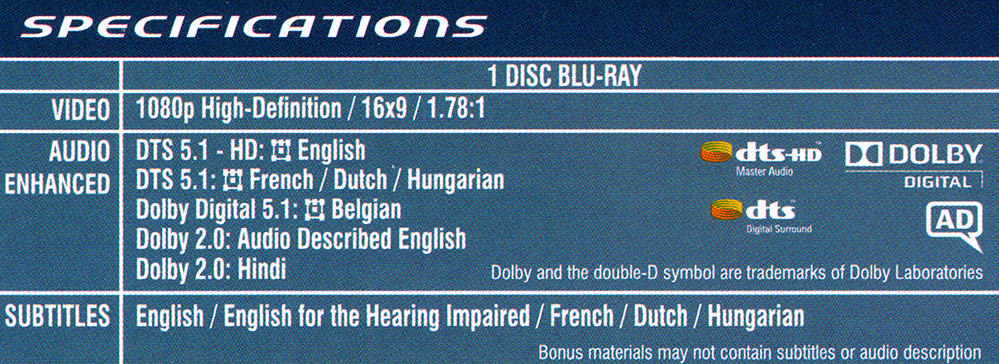
These different types of audio encoding have to be supported by the Blu-ray player so that they can be read from the disc. These are the names we will see printed on the back of the Blu-ray box.
On the other hand, audio decoding, or processing, is where the audio that is on the Blu-ray disc is read so that it can be played through our amplifier and speakers. This process is often done by the amplifier or receiver but can also be done by the player.
The decoding/processing stage involves splitting the audio into multiple channels and sending it to the speakers.
It is easy to believe that these two processes are essentially the same thing, but there are more decoding/processing types than there are encoding formats – so there must be a difference somewhere.
Therefore, it is useful to try and understand the difference between audio encoding and decoding/processing because some of the terms we come across relate to encoding, and some to the decoding process – and sometimes both.
Blu-ray Audio Formats
So what are the audio codecs that you may find encoded on a Blu-ray disc?
Until recently, there were seven audio formats supported by Blu-ray players. Of these, three were mandatory and have to be supported by a Blu-ray player, and four were optional.
With the introduction of the Ultra HD Blu-ray specification, there is now optional support for the new object-based codecs, Dolby Atmos and DTS:X.
Most current players won’t be able to decode these on board – but they will be able to bitstream them to an AV receiver.
Go to the buying guide if you want to find the top 4K Ultra HD Blu-ray players.
This doesn’t mean that all of these formats will be on the Blu-ray disc that you buy. The studios have a choice as to which audio formats they put on a disc.
The only rule they have to follow is that the primary audio track has to be one of the mandatory formats (which all players will support). Then any further audio tracks can then be either mandatory or optional (so your player may support them or may not).
Therefore, when you are buying a Blu-ray player, you will have to pay attention to the audio formats that your player supports if you have particular soundtracks that you need to play.
These are the Blu-ray audio codecs with some details on each.
1. Linear PCM (Mandatory)
Linear PCM is a mandatory audio format for Blu-ray and is often simply referred to as LPCM.
PCM audio is the standard for CD and DVD technology and has also been made a standard for Blu-ray. It is an uncompressed audio format so there is no loss in quality on the disc, but the big disadvantage is it takes up a lot of space.
It supports up to eight channels of audio, so can provide encoding for 7.1 soundtracks, however, it is more common to have stereo (2.0) or 5.1 surround sound in this format.
Although it can support 24-bit sample rates, often LPCM audio will be provided in 16-bit to save disc space.

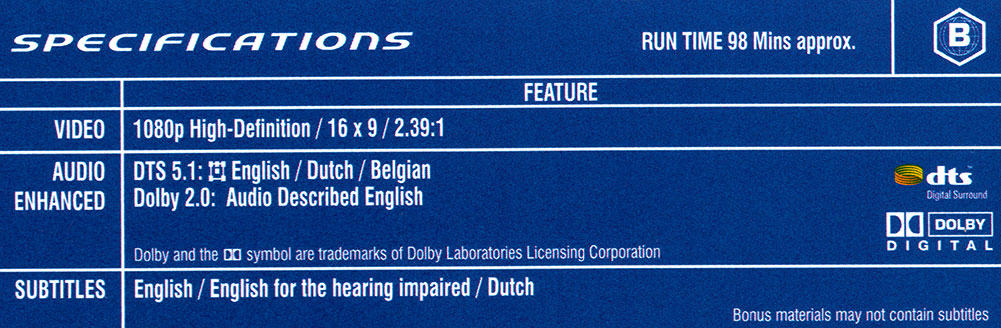
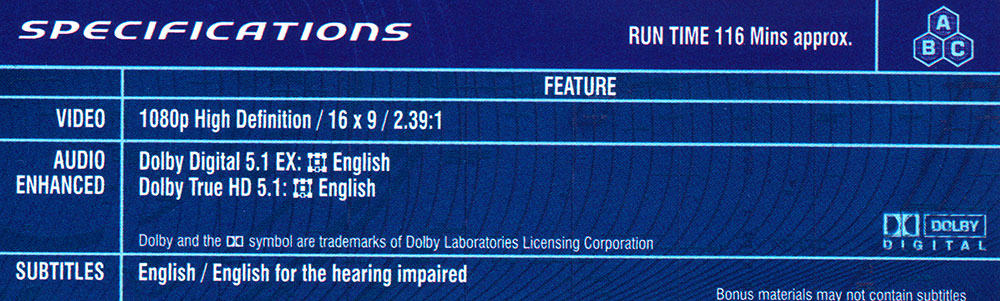
You can see the audio formats available on a Blu-ray disc by looking at the details on the cover – like in the example above.
You also get further details about the movie like the supported movie aspect ratio.
Just be clear, LPCM audio has no loss in quality as it is not compressed.
Therefore, an LPCM soundtrack will sound as good as a Dolby TrueHD and DTS HD-Master Audio version providing they all derive from the same master soundtrack.
However, the lossless HD versions are more likely to come from higher resolution masters as they can be compressed to use less space on the disc.
LPCM 5.1 surround audio can be passed through any version of HDMI (i.e. version 1.0 to 2.1) but will have to be downmixed to stereo for transfer over an optical/coaxial digital audio connection.
If you need to know more about HDMI or any of the other connection types, you can check out my guide to home theater connections.
You may see the term PCM used in some places.
What’s the difference between PCM and LPCM? PCM audio usually refers to 2-channel uncompressed audio, while LPCM describes multichannel PCM audio.
Although, not always, as you can see the example above lists PCM 5.1 as the audio format.
2. Dolby Digital (Mandatory)
Also commonly known as Dolby AC-3, Dolby 2.0 or DD 5.1.
Dolby Digital supports up to six channels of audio and so is limited to 5.1 surround sound and below. The maximum sample rate supported is 48 kHz.
It is a lossy format, or in other words, it compresses the audio to save space on the disc, but some of the original audio information is lost in the process. It is the most common form of 5.1 surround sound and is also found on DVD.
Like LPCM, Dolby Digital can be sent through HDMI or digital optical/coaxial connections.

Although commonly used to refer to 5.1 surround sound, the term ‘Dolby Digital’ is actually a generic name for the encoding system as a whole.
Therefore, it shouldn’t really be used on its own to describe the number of channels used.
For example, we can have stereo Dolby Digital – or Dolby 2.0.
We may also see some Blu-ray discs with Dolby Digital EX 5.1. This version of Dolby surround sound has an extra rear channel encoded into the two surround left and right channels to create a 6.1 mix.
In a 6.1 surround sound setup there is one extra speaker behind the viewing position between the left and right surrounds.
3. DTS (Mandatory)
Also known as DTS 5.1 or DTS Surround. This is effectively the DTS version of Dolby Digital.
Like Dolby Digital, DTS encoding is limited to a maximum of six audio channels and it compresses the audio to make the footprint on the disc smaller.
One difference is it supports a higher bitrate than Dolby Digital (1500 kbits/s compared to 640 kbits/s). However, in reality, the actual bitrate on the disc is often lower than the maximum.
As with Dolby Digital 5.1 EX, there is also a version of DTS which is aimed at 6.1 surround sound systems – DTS-ES.
The extra rear channel is encoded as part of the DTS 5.1 surround data, and will only be available on a system with an extra rear surround speaker.
There is much debate as to the difference between the audio quality of Dolby Digital vs DTS. If they have a choice, some people will always use one rather than the other.
However, you will also find other people who say they can’t tell the difference between the two.
In my view, there is a noticeable difference between DTS and Dolby Digital soundtracks, but which one you prefer just comes down to personal taste.
We will look into this issue in more detail in another article.
4. Dolby Digital Plus (Optional)
Also known as DD+ or E-AC-3. This audio encoding format is an extension of standard Dolby Digital.
Dolby Digital Plus supports 7.1 surround sound on Blu-ray discs, although the majority of Blu-ray movies only come with a 5.1 soundtrack.
The maximum bitrate of this format is also greatly increased to about 6 Mbits/s, therefore allowing for better audio quality. However, the maximum bitrate will be nearer 1.7 Mbits/s on Blu-ray.
Like Dolby Digital, the maximum sample rate is 48 kHz and it is still a lossy compression format that loses some of the original audio fidelity.
Dolby Digital Plus cannot be sent over coaxial or optical digital audio connections, and if they are used, then the player will automatically use the standard Dolby Digital track instead.
Therefore, an HDMI connection is required to make use of this format – unless your player has multichannel analog audio outputs.
Also, unless the Blu-ray player decodes the DD+ signal on-board first, you will require an HDMI 1.3 connection with a decoder on the AV receiver.
5. DTS-HD High Resolution Audio (Optional)
This codec is an extension of DTS 5.1 and increases surround sound support to 7.1 channels.
It has an increased bitrate on Blu-ray of 6 Mbits/s, which is much greater than DTS 5.1, however, it is still a lossy format that compresses the original audio to disc and loses some of the resolution in the process.
As far as the connections you can use for DTS-HD High Resolution Audio, the same rules apply as Dolby Digital.
Optical and coaxial connections aren’t supported. The player will switch to DTS 5.1 for this type of connection.
Also, a minimum HDMI 1.3 connection is required unless the player decodes on-board and sends the decoded signal as LPCM.
6. Dolby TrueHD (Optional)
Dolby TrueHD is a lossless format that compresses the audio onto the disc but creates an exact copy of the original studio master tapes.
Therefore, it provides the best possible audio reproduction of a movie’s soundtrack but also enables the data to be compressed on to disc.
Compared to DD 5.1 or DD+, the soundtrack will have a greater dynamic range, better surround imaging and you should hear more high and low frequencies – if your sound system is capable of doing justice to these improvements of course!
TrueHD is capable of supporting up to 14 channels of audio, which means it can easily cope with the 8 channels required for 7.1 surround sound playback on a Blu-ray disc.
7.1 channel audio is supported at 24-bit/96 kHz resolution – and 5.1 channels are available at 24-bit/192 kHz.
In this format of Dolby surround sound the maximum bitrate is increased to 18 Mbits/s which means that an HDMI connection is required to transport this type of audio.
As with DD+, if you want to bitstream this signal through HDMI to be decoded by your AV receiver, then you will need at least an HDMI 1.3 connection and an AV receiver with Dolby TrueHD decoding.
However, if your Blu-ray player is capable of decoding this format on-board, then it can send the decoded signal as LPCM over any version of HDMI.
7. DTS-HD Master Audio (Optional)
DTS-HD Master Audio is the DTS version of lossless audio.
If you have this on a Blu-ray disc then you have an exact bit-to-bit copy of the master tapes from the movie studio.

A Blu-ray disc with a lossless soundtrack may have this DTS version, the Dolby TrueHD version, or both. The annoying thing is some players may not support both types and so you may not always be able to use these higher resolution versions.
Master Audio has the highest bitrate of all at 24.5 Mbits/s on a Blu-ray disc, with a resolution for 8-channels of 24-bit/96 kHz. The same as Dolby.
8. Dolby Atmos (Optional)
Dolby Atmos is a new codec that introduces object-based soundtracks for the first time. It is slowly appearing as a soundtrack option on some Blu-ray releases, and this will increase as the technology becomes popular.

Dolby Atmos allows the filmmaker to have additional sound objects which can be added to the channel-based audio. These objects can place a sound in a 3D environment – and this sound can also be moved – up, down, left, right, forwards and backward.
You will need to add a minimum of two height speakers to hear this format – and have an AV receiver that can decode the bitstream from your Blu-ray player.
The good news is that this format is backward-compatible with older Blu-ray players – although you will need a minimum of HDMI 1.4.

The Dolby Atmos soundtrack on your Blu-ray will actually utilize the standard 5.1 or 7.1 soundtracks described above – so it doesn’t need a specific Atmos mix for the movie.
It will just add extra audio effects for the object-based sounds – layered on top of the standard codec.
If your system doesn’t have height-based speakers, then the standard multichannel audio soundtrack will play.
To learn more about Atmos, take a look at my simple guide to Dolby Atmos audio.
9. DTS:X (Optional)
DTS:X is the object-based audio standard from DTS.
Similar to Dolby Atmos, it may appear on your Blu-ray disc as a soundtrack option and will utilize the widely-supported DTS-HD Master Audio soundtrack as its base – to which DTS:X will add the object audio information.
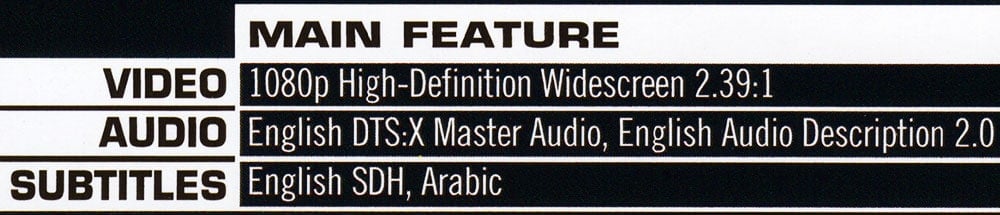
It requires an AV receiver that supports the decoding of DTS:X, which will then pass the audio to your speaker system – which ideally will have height speakers for the best effect.
However, the main difference from Dolby Atmos is that this format will work on an existing 5.1 or 7.1 speaker system – unlike Dolby Atmos, which requires at least two height speakers.
Wrapping Up
Now that you’ve gone through the different Blu-ray audio codecs, I’m sure you can appreciate how confusing it can be with all these format names! But the key is, when upgrading your home theater, you’ll want to check which formats your gear supports.
For example, if you want the best sound quality, look for a Blu-ray player and receiver that can handle advanced lossless codecs like Dolby TrueHD and DTS-HD Master Audio. And if you want the latest in immersive audio, make sure they support object-based formats like Dolby Atmos and DTS:X, too.
The good news is now that you understand how the audio is encoded on the discs, you’ll be better equipped to choose the AV components that can properly play back all your favorite Blu-ray soundtracks. It’s extra homework, I know, but it’s worth it in the end.
To know more about how an AV receiver deals with these audio formats, check out the guide to AV receiver listening modes.

About The Author
Paul started the Home Cinema Guide to help less-experienced users get the most out of today's audio-visual technology. He has been a sound, lighting and audio-visual engineer for around 20 years. At home, he has spent more time than is probably healthy installing, configuring, testing, de-rigging, fixing, tweaking, re-installing again (and sometimes using) various pieces of hi-fi and home cinema equipment. You can find out more here.


